
Burn & Mint V1 -> V2
Overview
This migration flow covers upgrading a burn and mint token handling mechanism from CCIP v1 to v2 where you have a
BurnMintTokenPool on each chain. It assumes your address is the registered administrator in the TokenAdminRegistry
on all chains.
This guide covers EVM-to-EVM only.
For simplicity, the steps below illustrate a 2-chain setup (Chain A ↔ Chain B). If your token is deployed across more chains, see Multi-chain considerations.
Out of scope
- Customized token pools
Definitions
- v1 pool: Any standard pool version 1.5.x or 1.6.x (
BurnMintTokenPool 1.5.1,BurnMintTokenPool 1.6.0, etc.)- Includes
BurnMintTokenPool,BurnWithFromMintTokenPool,BurnFromMintTokenPool; each concrete pool inheritsBurnMintTokenPoolABstract, which inherits the baseTokenPoolabstraction.
- Includes
- v2 pool: Pool version 2.0.0 (
BurnMintTokenPool 2.0.0) that you want to upgrade to. - TokenAdminRegistry: The CCIP contract where a token ↔ token pool mapping is registered.
Flow diagram
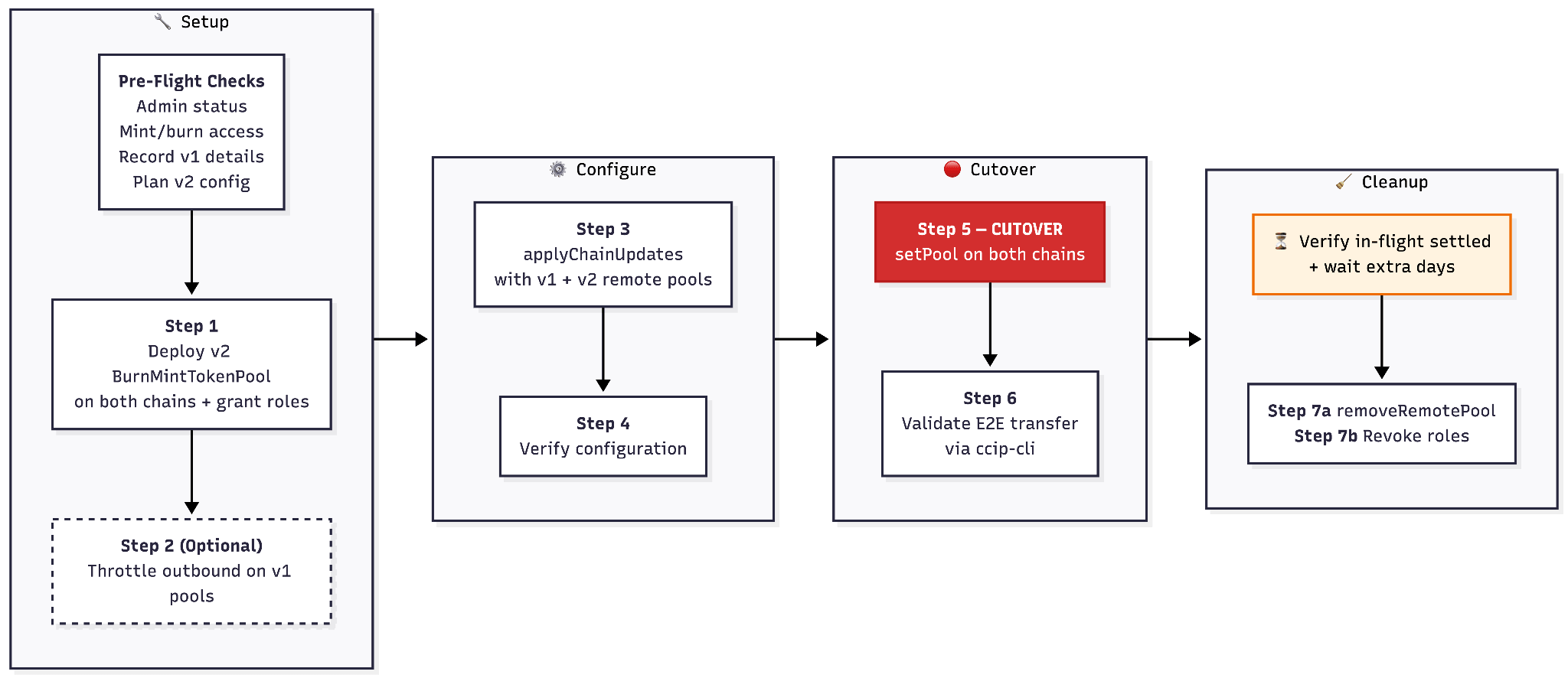
Batching operations
If you control the administrator and pool owner addresses through a multisig that supports meta-transactions (for example, Safe), you can batch multiple migration steps into a single atomic transaction.
Recommended groupings per chain:
Batch 1 — Configure + cutover
applyChainUpdates (Step 3) + setPool (Step 5).
This configures the v2 pool and activates it in a single transaction, eliminating the window between configuration and cutover.
Batch 2 — Cleanup
removeRemotePool (Step 7a) + revokeMintRole + revokeBurnRole (Step 7b).
This combines all cleanup operations.
Each batch must be executed per chain — you cannot batch cross-chain operations into a single transaction.
Pre-flight checks
Before starting the migration, verify the following on both chains:
1. Confirm your admin status in TokenAdminRegistry
- Call
TokenAdminRegistry.getTokenConfig(tokenAddress). This returns a struct with three fields:.administrator— must match your address.pendingAdministrator— must beaddress(0)(no pending admin transfer in progress).tokenPool— the current v1 pool address (record this)
- If
.administratoris a multisig or timelock, execute subsequent steps through that governance mechanism. If using a multisig like Safe, you can batch multiple steps into a single meta-transaction for atomicity. - Note: even if
.pendingAdministratoris non-zero, the current.administratorcan still callsetPool. However, resolving the pending transfer before starting is recommended to avoid confusion. For example, if an administrator change was intended in the past but no longer relevant,transferAdminRole(localToken, address(0))can be called to cancel the previous transfer.
2. Confirm you can grant mint/burn roles on the token
- The new v2 pool will need mint and burn privileges on the existing token.
- Verify the address you control can call
grantMintAndBurnRoles(or equivalent) on the token contract. - If token ownership was transferred to a different address (different EOA, multisig, timelock, etc.), you must coordinate with that owner.
- This is a hard blocker — if you can't grant roles to the new pool, you can't migrate.
3. Record your existing v1 deployment details
Collect and export the following:
- Token addresses on each chain
- v1 pool addresses on each chain
- Current rate limiter settings on the v1 pools (inbound and outbound per remote chain). You'll replicate these on
the new v2 pools.
- Read via two separate calls per remote chain (v1.5.x / v1.6.x):
pool.getCurrentInboundRateLimiterState(remoteChainSelector)→ returns the inboundTokenBucket.pool.getCurrentOutboundRateLimiterState(remoteChainSelector)→ returns the outboundTokenBucket.- Each
TokenBucketis{ tokens, lastUpdated, isEnabled, capacity, rate }. The struct is identical across v1.5.1, v1.6.1, and v2.0 — values can be copied directly. - Note: v2 collapses these into a single
getCurrentRateLimiterState(remoteChainSelector, fastFinality)call returning both buckets, but v1 doesn't have that signature.
- Read via two separate calls per remote chain (v1.5.x / v1.6.x):
- Current token transfer fee parameters (if any were configured for your token). In v1, these are set by Chainlink on
the OnRamp (v1.5) or FeeQuoter (v1.6), not on the pool. In v2, you can set these directly on your own pool. Record
them so you can plan your v2 fee config in step 4:
- v1.5 lanes: call
OnRamp.getTokenTransferFeeConfig(tokenAddress)on the source chain OnRamp (one OnRamp per destination chain in v1.5). - v1.6 lanes: call
FeeQuoter.getTokenTransferFeeConfig(destChainSelector, tokenAddress). The FeeQuoter address can be found viaOnRamp.getDynamicConfig().feeQuoter. - Both return:
{ minFeeUSDCents, maxFeeUSDCents, deciBps, destGasOverhead, destBytesOverhead, isEnabled }.
- v1.5 lanes: call
4. Plan your v2 configuration
v2 pools introduce features not available in v1. Most settings can be changed post-deployment via setter functions.
However, a few are immutable (set in the constructor and cannot be changed): the token address, token decimals, RMN
proxy. On the AdvancedPoolHooks contract, the allowlistEnabled flag is also immutable — if you deploy hooks with an
empty allowlist, you cannot enable allowlisting later without deploying a new hooks contract.
Pool variant selection
The migration flow is identical regardless of token interface. What changes is which v2 pool variant you deploy in Step 1:
| Token's burn function | v2 Pool to deploy | Notes |
|---|---|---|
burn(uint256 amount) | BurnMintTokenPool | Standard — most common |
burnFrom(address, uint256 amount) | BurnFromMintTokenPool | For tokens using allowance-based burn |
burn(address, uint256 amount) | BurnWithFromMintTokenPool | Two-param burn variant |
| Token has no burn (transfer to dead address) | BurnToAddressMintTokenPool | Uses safeTransfer to a preconfigured burn address instead of calling burn. Constructor takes an extra burnAddress parameter (immutable — cannot be changed after deployment). |
All variants call mint(address to, uint256 amount) for inbound transfers and the corresponding burn function for
outbound transfers.
Advanced pool hooks (constructor decision)
Decide whether to deploy an AdvancedPoolHooks contract and pass its address in the pool constructor
(advancedPoolHooks parameter). You can also pass address(0) and attach hooks later via
updateAdvancedPoolHooks(IAdvancedPoolHooks) (onlyOwner).
AdvancedPoolHooks enables:
- Allowlisting: Restrict which addresses can initiate transfers (moved from pool constructor in v1 to hooks in v2).
- CCV (Cross-Chain Verifier) management:
- Configure per-chain verifiers for inbound and outbound transfers.
- Threshold amount for additional CCVs: When a transfer amount meets or exceeds this threshold, additional CCVs are required on top of the base CCVs — providing tiered security for high-value transfers.
- Policy engine: Attach a custom policy contract for pre-flight/post-flight validation via
setPolicyEngine(address)(onlyOwner).
Constructor: (address[] allowlist, uint256 thresholdAmountForAdditionalCCVs, address policyEngine, address[] authorizedCallers)
Deployment order: The token pool must be an authorized caller on the AdvancedPoolHooks contract (the hooks validate
msg.sender via _validateCaller()). Since the pool needs the hooks address in its constructor and the hooks need the
pool as an authorized caller, deploy hooks first (with empty authorizedCallers), then deploy the pool with the hooks
address, then call applyAuthorizedCallerUpdates on the hooks to add the pool address.
If you don't need any of these features, pass address(0) for advancedPoolHooks in Step 1.
Fast finality (FTF)
By default, CCIP waits for full source-chain finality before processing a transfer. Fast finality lets senders request a
different finality mode by setting requestedFinalityConfig in their CCIP extraArgs.
Multiple components validate the request: the OnRamp checks that the value encodes exactly one mode — a flag bit or a
block depth, never both at once; the pool checks it falls within its own allowedFinalityConfig; the OffRamp checks it
against the receiver's finality config.
As a pool owner, allowedFinalityConfig is the only field you control.
Encoding — both fields are bytes4 with the same bit layout:
- bits 16+ — flags: bit 16 =
WAIT_FOR_SAFE_FLAG(safe head instead of full finality) - bits 0–15 — block depth
bytes4(0)(WAIT_FOR_FINALITY_FLAG) = full finality, the default for both fields
For allowedFinalityConfig: flag bits use bitwise AND (any overlapping flag accepts the request), and block depth is a
minimum (requestedDepth >= allowedDepth). You can combine both in one value — the pool accepts a request when either
rule matches.
If you do not set block depth (bits 0–15 = 0), block-depth-based requests are rejected.
Recommendation: in Solidity code, prefer FinalityCodec constants/helpers (WAIT_FOR_SAFE_FLAG, _encodeBlockDepth,
_encodeBlockDepthAndSafeFlag) to avoid manual bitmath mistakes. For off-chain tooling (Hardhat, Go,...), implement the
same encoding logic in your language runtime, since these Solidity helper functions are internal and not ABI-callable.
Examples:
| Intent | bytes4 hex | How to construct in Solidity |
|---|---|---|
| Full finality (default) | 0x00000000 | bytes4(0) |
| Safe head | 0x00010000 | bytes4(uint32(1 << 16)) or FinalityCodec.WAIT_FOR_SAFE_FLAG |
| Accept ≥10-block depth | 0x0000000A | bytes4(uint32(10)) |
| Accept ≥100-block depth | 0x00000064 | bytes4(uint32(100)) |
| Pool accepts safe-head or ≥10-block | 0x0001000A | bytes4(uint32(1 << 16) | uint32(10)) |
- Decide whether you want to allow fast finality on this pool. If not, leave the default (
bytes4(0)) — the pool only accepts full-finality transfers. If yes, choose which mode(s) then callsetAllowedFinalityConfig(bytes4 allowedFinality). Read the current value viagetAllowedFinalityConfig(). - When fast finality is enabled, the pool maintains separate rate limiter buckets per remote chain — one for default
(wait-for-finality), one for fast finality. If the fast-finality bucket is not configured (
isEnabled = false), fast-finality transfers fall back to the default bucket. - v2 lets you charge two independent fees per transfer, each with a normal-finality and a fast-finality variant:
- Flat fee (
finalityFeeUSDCents/fastFinalityFeeUSDCents): added on top of the sender's existing transfer cost. The OnRamp transfers this amount directly to your pool contract. - Bps fee (
finalityTransferFeeBps/fastFinalityTransferFeeBps): a percentage (in basis points) deducted from the token amount insidelockOrBurn. From the sender perspective, this is not part of CCIP fees (for exampleRouter.getFees). However, the recipient gets fewer tokens. The pool retains the deducted tokens. - If you skip
applyTokenTransferFeeConfigUpdates(leavingisEnabled = false), the pool tells the OnRamp it has no custom fee config, and the OnRamp falls back to FeeQuoter — which only covers a flat USD fee and gas overhead, no bps. If you do call it withisEnabled = truebut leave all fee fields at zero, neither fee applies.
- Flat fee (
Rate limits
- v2 pools support separate rate limits for default (wait-for-finality) and fast finality per remote chain.
- Plan to copy your v1 rate limiter values (recorded in step 3) into the default finality bucket. If you enable fast finality, plan a separate rate limit for that bucket.
- After deployment, call
setRateLimitConfig(RateLimitConfigArgs[])(onlyOwneror rate limit admin). The struct is:
struct RateLimitConfigArgs {
  uint64 remoteChainSelector;
  bool fastFinality;                        // false → default bucket, true → fast finality bucket
  RateLimiter.Config outboundRateLimiterConfig;
  RateLimiter.Config inboundRateLimiterConfig;
}
- To read current rate limits after configuration:
getCurrentRateLimiterState(remoteChainSelector, fastFinality)returns(TokenBucket outbound, TokenBucket inbound)in a single call.- pass
falsefor the default (wait-for-finality) bucket,truefor the fast finality bucket.
Token transfer fee configuration
In v2, you can control fees and other fee-impacting configs in your own pool.
Use the v1 fee data recorded in step 3 and the mapping table below to plan your v2 fee config. After deployment, call
applyTokenTransferFeeConfigUpdates(TokenTransferFeeConfigArgs[], uint64[] disableTokenTransferFeeConfigs) on your pool
(onlyOwner) after deployment.
v1 → v2 field mapping:
| v1 field | v2 pool field | Conversion |
|---|---|---|
destGasOverhead | destGasOverhead | Same field. Only set if you want values different from the FeeQuoter defaults (configured by Chainlink per destination chain). Must be non-zero if set. |
destBytesOverhead | destBytesOverhead | Same field. Only set if you want values different from the FeeQuoter defaults. |
v2-only fields (no v1 equivalent — configure as needed):
| v2 pool field | Description |
|---|---|
finalityTransferFeeBps | Percentage-based fee (in basis points) deducted from the transferred token amount for default (wait-for-finality) transfers. Set to 0 by default. |
finalityFeeUSDCents | Flat fee in USD cents for default (wait-for-finality) transfers. Set to 0 by default. |
fastFinalityFeeUSDCents | Flat fee in USD cents for fast-finality transfers. Set to 0 by default. Configure if you enable fast finality and want a different flat fee than the default. |
fastFinalityTransferFeeBps | Percentage-based fee (in basis points) deducted from the transferred token amount for fast-finality transfers. Set to 0 by default. Configure if you want a percentage fee for fast finality. |
Rate limit admin & fee admin delegation
v2 pools allow delegating specific responsibilities to separate addresses without giving full pool ownership:
- A rate limit admin can call
setRateLimitConfig()to modify rate limits. - A fee admin can call
withdrawFeeTokens(address[], address)to withdraw accrued fees (only relevant if you configured fees viafinalityTransferFeeBps,finalityFeeUSDCents,fastFinalityTransferFeeBps, orfastFinalityFeeUSDCents).
If you want to use delegation, decide which addresses will fill these roles. After deployment, call
setDynamicConfig(address router, address rateLimitAdmin, address feeAdmin) on the pool (onlyOwner) to assign them.
This replaces all three values at once — pass the current value for any field you don't want to change.
Pool ownership transfer (recommended for production)
After migration, consider transferring pool ownership to a multisig or timelock contract via
pool.transferOwnership(timelockAddress) followed by acceptance through governance.
5. Verify pool ownership model
- After deploying the new v2 pool, the deployer becomes the initial owner.
applyChainUpdatesandremoveRemotePoolrequire pool owner (onlyOwner) privileges.setPoolon TokenAdminRegistry requires TokenAdminRegistry administrator (onlyTokenAdmin) privileges.- If these are different addresses, coordinate accordingly.
Step 1: Deploy new v2 token pools
- Deploy a
BurnMintTokenPool 2.0.0on each chain, pointing to the existing token address. - Grant mint and burn roles to the new v2 pool on the token contract on each chain.
- Constructor parameters:
constructor(
    IBurnMintERC20 token,        // existing token address
    uint8 localTokenDecimals,    // token decimals on this chain
    address advancedPoolHooks,   // address(0) to skip, or AdvancedPoolHooks contract
    address rmnProxy,            // RMN proxy address for this chain
    address router               // CCIP router address for this chain
)
- Pass
address(0)foradvancedPoolHooksif you don't need allowlisting, custom CCVs, or a policy engine. You can attach hooks later viaupdateAdvancedPoolHooks. - Network-specific addresses (RMN proxy, router) must match the current CCIP deployment on each chain. See the CCIP Directory for contract addresses per chain.
Note — dual mint/burn window: From this point until Step 7b, both old v1 and new v2 pools have mint/burn roles on the token. The old v1 pool still routes live traffic. The new v2 pool has roles but is not yet active in CCIP. Both pools can mint/burn independently during this window.
State after this step
- Old v1 pools: still active, still routing all CCIP traffic, still have mint/burn roles.
- New v2 pools: deployed, have mint/burn roles, but not yet connected to CCIP routing.
Step 2 (optional): Pause outbound transfers on old v1 pools
- Restrict outbound transfers on the old v1 pools on both chains. Set outbound rate limiter to
isEnabled: truewithcapacity: 2andrate: 1. This is the strictest configuration that works across all pool versions (v1.5.x, v1.6.x) — it allows at most 2 tokens initially with a 1 token/sec refill, effectively throttling transfers to near zero. - Do NOT use
isEnabled: false— this disables rate limiting entirely, allowing unlimited transfers. - Call
setChainRateLimiterConfig(remoteChainSelector, outboundConfig, inboundConfig)on the v1 pool (onlyOwneror rate limit admin). Keep inbound unchanged so in-flight messages can still arrive. - This blocks new cross-chain transfers while the migration completes, creating a brief maintenance window.
Why this is optional
- The
setPoolcall in Step 5 is atomic — once executed, new traffic immediately routes through the v2 pool. - Because Step 3 configures the new pool to recognize both old and new remote pools, in-flight messages are handled safely without a pause.
- However, pausing gives you a clean cutover with zero overlap if you prefer that.
If you skip this step
- There is a short window between
setPoolon chain A andsetPoolon chain B where one chain routes through the new pool and the other still routes through the old pool. This is safe because of the dual remote pool configuration in Step 3, but pausing eliminates this window entirely.
Step 3: Configure new v2 pools (applyChainUpdates)
On each chain, call applyChainUpdates on the new v2 pool to configure remote chain connections.
Function signature
function applyChainUpdates(
    uint64[] calldata remoteChainSelectorsToRemove,
    ChainUpdate[] calldata chainsToAdd
) external onlyOwner
Each ChainUpdate contains:
remoteChainSelector(uint64)remotePoolAddresses(bytes[]) — array of remote pool addressesremoteTokenAddress(bytes) — the token address on the remote chainoutboundRateLimiterConfig(isEnabled, capacity, rate)inboundRateLimiterConfig(isEnabled, capacity, rate)
Remote pool addresses — include both old and new
The remotePoolAddresses array must include both the old v1 pool and the new v2 pool on the remote chain. Both
old and new remote pool addresses are passed in a single applyChainUpdates call — no separate addRemotePool calls are
needed. The contract uses an EnumerableSet internally, so adding pools is inherently additive — multiple pools per
remote chain are supported by design.
- v2 pool on chain A:
remotePoolAddresses = [encode(v1ChainBPool), encode(v2ChainBPool)] - v2 pool on chain B:
remotePoolAddresses = [encode(v1ChainAPool), encode(v2ChainAPool)]
Address encoding: remotePoolAddresses is typed as bytes[] and remoteTokenAddress as bytes — the contract
stores whatever bytes you pass with no format validation beyond a non-zero-length check.
- EVM remote chain: left-pad the 20-byte address to 32 bytes. In Solidity:
abi.encode(poolAddress). In Go:common.LeftPadBytes(addr.Bytes(), 32). Both produce the same 32 bytes — the 20-byte address right-aligned with 12 leading zero bytes.
Why both pools must be listed: Messages sent through the old v1 pool before the cutover may still be in-flight. When they arrive at the destination, the OffRamp validates that the source pool address encoded in the message matches a configured remote pool address on the destination pool. Without the old v1 pool address in the list, these in-flight messages would fail validation.
Rate limiter configuration
- Rate limiters are configured atomically as part of the
applyChainUpdatescall (not a separate transaction). - Replicate your existing v1 rate limiter settings (or adjust as needed for v2). The struct is identical between v1 and v2.
- Configure both inbound and outbound rate limits per remote chain.
- If you paused transfers in Step 2, set the v2 pool rate limits to your desired production values (not zero — the v2 pool needs to be ready to handle traffic after cutover).
- If you enabled fast finality (see pre-flight step 4), configure the fast finality rate limits separately via
setRateLimitConfigafter deployment. - Note: setting
isEnabled: falsemeans unlimited transfers (no rate limiting). SetisEnabled: truewith appropriate capacity and rate to enforce limits.
Remote token address
- Set the remote token address for each remote chain (same token addresses as your v1 configuration).
Error recovery
applyChainUpdates reverts with ChainAlreadyExists if the remote chain is already configured. You cannot call it twice
for the same chain. If you need to fix a misconfiguration after the initial call:
- Add a missing remote pool: call
addRemotePool(remoteChainSelector, encodedRemotePoolAddress)(onlyOwner) — second arg isbytes, encoded as described above. - Remove a wrong remote pool: call
removeRemotePool(remoteChainSelector, encodedRemotePoolAddress)(onlyOwner) — pass the same bytes that were stored when adding. - Change rate limiters: call
setRateLimitConfig(RateLimitConfigArgs[])(onlyOwneror rate limit admin) - Fully reconfigure a chain: first remove it via
applyChainUpdates([chainSelector], []), then re-add it with the correct configuration
Step 4: Verify new pool configuration
Before cutting over, verify the new v2 pools are correctly configured on both chains.
Core checks:
- Remote chain configs include both old v1 and new v2 remote pool addresses.
- Remote token addresses are correct.
- Inbound and outbound rate limiters match your intended settings.
- The new v2 pool has mint and burn roles on the token (verify via the token contract's role-checking functions).
- Pool owner is the address you control (
pool.owner()). -
TokenAdminRegistry.getTokenConfig(token).pendingAdministratorisaddress(0).
If you configured v2 features (from pre-flight step 4 planning):
- AdvancedPoolHooks: pool is an authorized caller on the hooks contract (
hooks.getAllAuthorizedCallers()includes pool). - Fast finality:
getAllowedFinalityConfig()returns your intendedbytes4value. - Fast finality rate limits: configured if planned (check via
getCurrentRateLimiterState(remoteChainSelector, true)— thetrueselects the fast-finality bucket). - Token transfer fees: configured if planned (call
getTokenTransferFeeConfig(address(0), destChainSelector, bytes4(0), "")on the pool and verify the returnedTokenTransferFeeConfigmatches your intended values). - Admin delegation:
getDynamicConfig()returns the correct router, rateLimitAdmin, and feeAdmin.
Verify before proceeding — setPool in the next step routes live traffic through the v2 pools.
Step 5: Activate new v2 pools (setPool) — the cutover
- Ensure all v2 features planned in pre-flight step 4 (hooks, fast finality, rate limits, fees, admin delegation) are
configured before proceeding. Once
setPoolexecutes, live traffic flows through the v2 pool. - On each chain, call
TokenAdminRegistry.setPool(tokenAddress, newV2PoolAddress)to point the registry to the new v2 pool. - Call
setPooldirectly — your address is already the registered administrator. Do not callproposeAdministratororacceptAdminRole; these are only for initial registration, not for pool upgrades. - Once executed on a chain, all new CCIP transfers for this token on that chain route through the new v2 pool.
- Execute on both chains. The order does not matter because of the dual remote pool configuration from Step 3 — both old-to-new and new-to-new message flows are supported.
What happens to in-flight messages after cutover
- Messages sent through the v1 pool before
setPoolwill still arrive at the destination. - The destination's new v2 pool recognizes the old v1 remote pool address (configured in Step 3), so these messages validate and execute correctly.
- No messages are lost or stuck.
Rollback: If you discover issues after cutover on one chain, you can call
TokenAdminRegistry.setPool(tokenAddress, oldV1PoolAddress) to revert that chain back to the v1 pool. This is safe
because the v1 pool is still deployed and still has mint/burn roles. However, any in-flight messages sent through the v2
pool during the brief window will still need the v2 remote pool address configured on the destination — so only roll
back if necessary and plan accordingly.
Step 6: Validate end-to-end
- Send a cross-chain token transfer using
ccip-cliand verify it completes successfully on the destination chain.ccip-cliuses the CCIP SDK and queriesapi.ccip.chain.linkto track message status end-to-end. - Confirm the transfer was routed through the new v2 pool (check transaction logs for the v2 pool address).
- Test a transfer in the reverse direction to validate both paths.
Step 7: Post-migration cleanup
Important: Perform these steps only after all in-flight messages from the old v1 pools have settled.
How to verify: Check the CCIP Explorer or use ccip-cli (which queries
api.ccip.chain.link — will soon support filtering by source token address) to confirm all messages originating from
the old v1 pool addresses show SUCCESS status.
Additional safety margin: Even after verifying via CCIP Explorer / ccip-cli, it is recommended to wait a couple of extra days as an additional precaution. There is no cost to waiting longer: keeping old v1 pool addresses in the remote pool list has no performance impact.
Note: Steps 7a and 7b are optional. The old pools are already inert (removed from TokenAdminRegistry) and pose minimal risk if cleanup is deferred.
7a. Remove old v1 remote pool addresses from the new v2 pools
Two mechanisms are available:
removeRemotePool(uint64 remoteChainSelector, bytes calldata remotePoolAddress)— removes a specific pool address from a specific remote chain.onlyOwner. Use this when you want to keep the chain connected but remove only the old v1 pool address. This is the correct approach for migration cleanup.applyChainUpdates(remoteChainSelectorsToRemove, [])— removes an entire remote chain from the pool configuration. Only use this if you want to completely disconnect from a remote chain (not typical for migration).
For migration cleanup, call removeRemotePool on each chain:
- On chain A v2 pool:
removeRemotePool(chainBSelector, encodedOldV1ChainBPoolAddress) - On chain B v2 pool:
removeRemotePool(chainASelector, encodedOldV1ChainAPoolAddress)
Caution: Removing a remote pool address causes any still-pending messages from that pool to fail validation on the destination. Only proceed once you are confident all old v1 messages have been executed (verify via CCIP Explorer or ccip-cli (search transactions)).
If you remove prematurely and discover a stuck in-flight message, you can re-add the v1 pool address using
addRemotePool(remoteChainSelector, encodedOldV1PoolAddress) (onlyOwner) to unblock it — use the same encoded bytes as
before.
7b. (Optional) Revoke mint and burn roles from old v1 pools
The v1 pool is already removed from the TokenAdminRegistry at this point, so it can no longer route CCIP traffic. Revoking its mint/burn roles on the token contract is an extra hardening step — it eliminates any residual ability to mint or burn tokens.
How you do this depends on which token contract you're using, as each has its own access control model.
BurnMintERC677— does not use OpenZeppelin AccessControl. Roles are managed through an owner-controlled address set. CallrevokeMintRole(oldV1PoolAddress)andrevokeBurnRole(oldV1PoolAddress). Both areonlyOwner.BurnMintERC20— uses OpenZeppelin AccessControl withDEFAULT_ADMIN_ROLEas the role admin forMINTER_ROLEandBURNER_ROLE. CallrevokeRole(MINTER_ROLE, oldV1PoolAddress)andrevokeRole(BURNER_ROLE, oldV1PoolAddress). Caller must holdDEFAULT_ADMIN_ROLE.CrossChainToken(the chainlink-ccip v2 token standard) — also uses AccessControl, but explicitly setsBURN_MINT_ADMIN_ROLE(keccak256("BURN_MINT_ADMIN_ROLE")) as the role admin for both roles. SamerevokeRolecalls as above, but caller must holdBURN_MINT_ADMIN_ROLEinstead.
Before running this step, verify which token contract you have and that your address holds the required role.
State after cleanup
- v2 pools: active, routing all CCIP traffic, only v2 remote pools configured.
- v1 pools: orphaned, no longer in TokenAdminRegistry, no mint/burn roles (if revoked).
Multi-chain considerations
3+ chain deployments
This guide covers a 2-chain scenario. For tokens deployed across 3+ chains:
- Each pool must configure remote pool entries for every other chain (both old v1 and new v2 pools).
- Example for a 3-chain deployment (Ethereum, Arbitrum, Avalanche) — each entry is the encoded pool address:
- Ethereum v2 pool:
[encode(v1ArbitrumPool), encode(v2ArbitrumPool), encode(v1AvalanchePool), encode(v2AvalanchePool)] - Arbitrum v2 pool:
[encode(v1EthereumPool), encode(v2EthereumPool), encode(v1AvalanchePool), encode(v2AvalanchePool)] - Avalanche v2 pool:
[encode(v1EthereumPool), encode(v2EthereumPool), encode(v1ArbitrumPool), encode(v2ArbitrumPool)]
- Ethereum v2 pool:
Gradual migration
You can migrate chains sequentially (not all at once), but remote pool configuration must be bilateral. Before
activating a v2 pool on chain A via setPool, the old v1 pool on chain B must be updated to recognize chain A's new v2
pool address — otherwise chain B rejects messages from chain A's v2 pool (InvalidSourcePoolAddress).
For each chain you migrate:
- On all remote chains that still have v1 pools, call
addRemotePool(chainSelector, encodedNewV2PoolAddress)on the v1 pool to add the new v2 pool address. - Then call
setPoolon the chain being migrated.
This ensures the v1 pools on not-yet-migrated chains accept messages from newly activated v2 pools.
v2-specific features only work fully when both the source and destination pools are v2:
- Fast finality requests from a chain still running a v1 pool are rejected by the OnRamp.
- Pool-specific CCV requirements fall back to lane defaults when the remote pool is v1.
- Pool-level fee overrides only apply when the source pool is v2.
To use v2 features on a lane, both ends must be migrated to v2 first.